Claude Code's /compact is the wrong tool for the job it's supposed to do. It fires late, and by the time it runs the model has already started to drift. Retrieval accuracy drops from around 92% at 256K tokens down to 78% at 1M. The middle turns start getting edited without being read. Earlier decisions get contradicted. If you wait for /compact to decide the session needs rescuing, the session is already damaged.
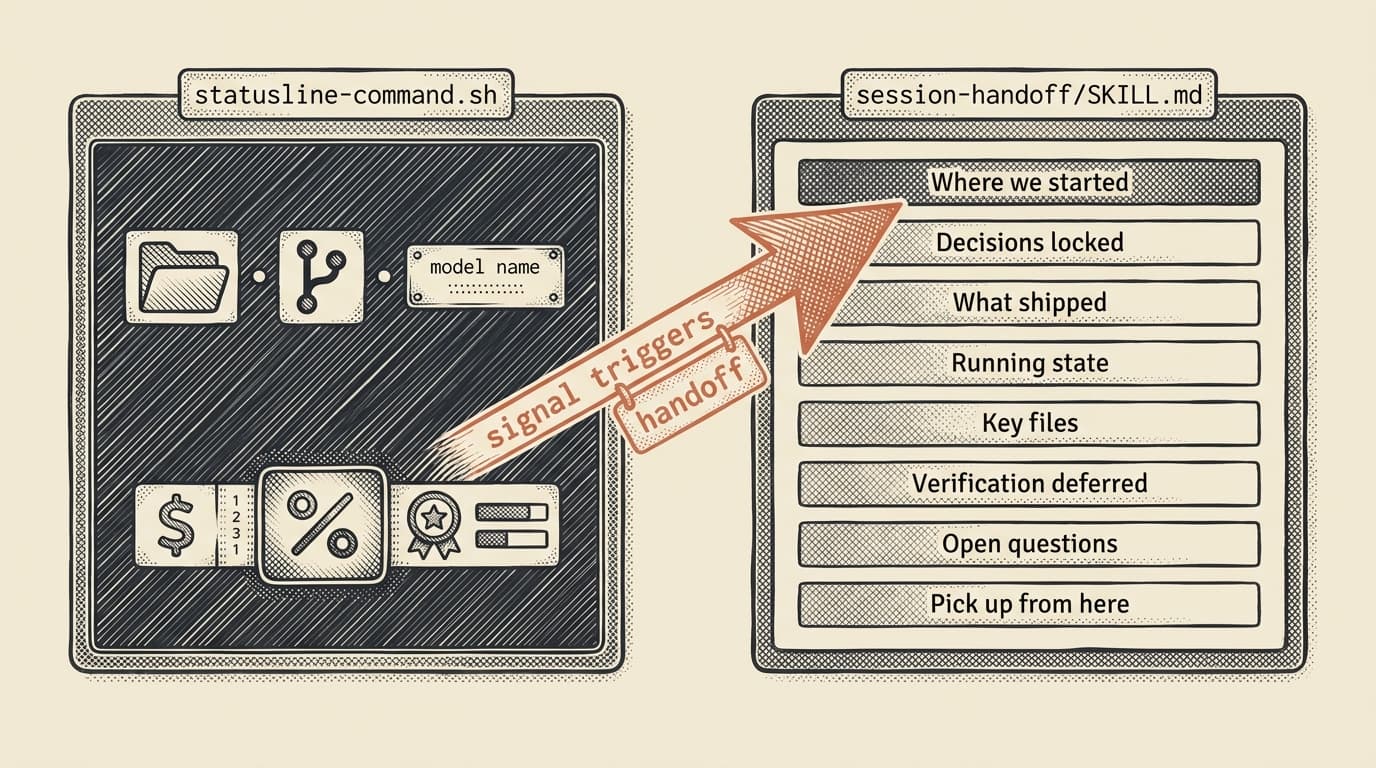
The fix isn't one script. It's two. A status line that tells you when context is degrading, and a session-handoff skill that writes a dense summary you paste into a fresh session. Together they cost about 200 lines of bash and markdown and they replace /compact entirely in my workflow. Here's how to build both.
Step 1. Drop in the status line script
Save this as ~/.claude/statusline-command.sh and chmod +x it. It reads JSON from stdin (Claude Code injects the session state there every tick) and prints a two-line status.
#!/usr/bin/env bash
# Claude Code status line — two-line, Nerd Font, context + usage + Auckland badge
set -euf -o pipefail
CACHE_DIR="${XDG_RUNTIME_DIR:-$TMPDIR}/claude-sl.$UID"
mkdir -p "$CACHE_DIR"
chmod 700 "$CACHE_DIR"
input=$(cat)
current_dir=$(printf '%s' "$input" | jq -r '.workspace.current_dir // empty')
project_dir=$(printf '%s' "$input" | jq -r '.workspace.project_dir // empty')
model_name=$(printf '%s' "$input" | jq -r '.model.display_name // empty')
remaining=$(printf '%s' "$input" | jq -r '.context_window.remaining_percentage // empty')
cost=$(printf '%s' "$input" | jq -r '(.cost.total_cost_usd // .total_cost_usd) // empty')
dir=$(basename "${current_dir:-/}")
git_branch=""; git_dirty=""
if [ -n "$project_dir" ] && [ -d "${project_dir}/.git" ]; then
git_branch=$(git --no-optional-locks -C "$project_dir" branch --show-current 2>/dev/null) || git_branch="detached"
git_count=$(git --no-optional-locks -C "$project_dir" status --porcelain 2>/dev/null | wc -l | tr -d ' ') || git_count=0
[ "$git_count" -gt 0 ] && git_dirty=" *"
fi
ctx_color="\033[32m"; remaining_int=""
if [ -n "$remaining" ]; then
remaining_int=$(printf "%.0f" "$remaining")
[ "$remaining_int" -le 20 ] && ctx_color="\033[31m"
[ "$remaining_int" -gt 20 ] && [ "$remaining_int" -le 50 ] && ctx_color="\033[33m"
fi
usage_5h=$(printf '%s' "$input" | jq -r '.rate_limits.five_hour.used_percentage // empty')
usage_7d=$(printf '%s' "$input" | jq -r '.rate_limits.seven_day.used_percentage // empty')
line1="\033[36m ${dir}\033[0m"
[ -n "$git_branch" ] && line1="${line1} \033[33m ${git_branch}\033[31m${git_dirty}\033[0m"
[ -n "$model_name" ] && line1="${line1} \033[32m ${model_name}\033[0m"
line2=""
if [ -n "$cost" ]; then
cost_fmt=$(printf '$%.4f' "$cost" 2>/dev/null) || cost_fmt="\$$cost"
line2="\033[35m ${cost_fmt}\033[0m"
fi
[ -n "$remaining_int" ] && line2="${line2:+$line2 }${ctx_color} ${remaining_int}%\033[0m"
printf '%b\n%b\n' "$line1" "$line2"Register it in ~/.claude/settings.json:
{
  "statusLine": {
    "type": "command",
    "command": "bash /Users/you/.claude/statusline-command.sh"
  }
}
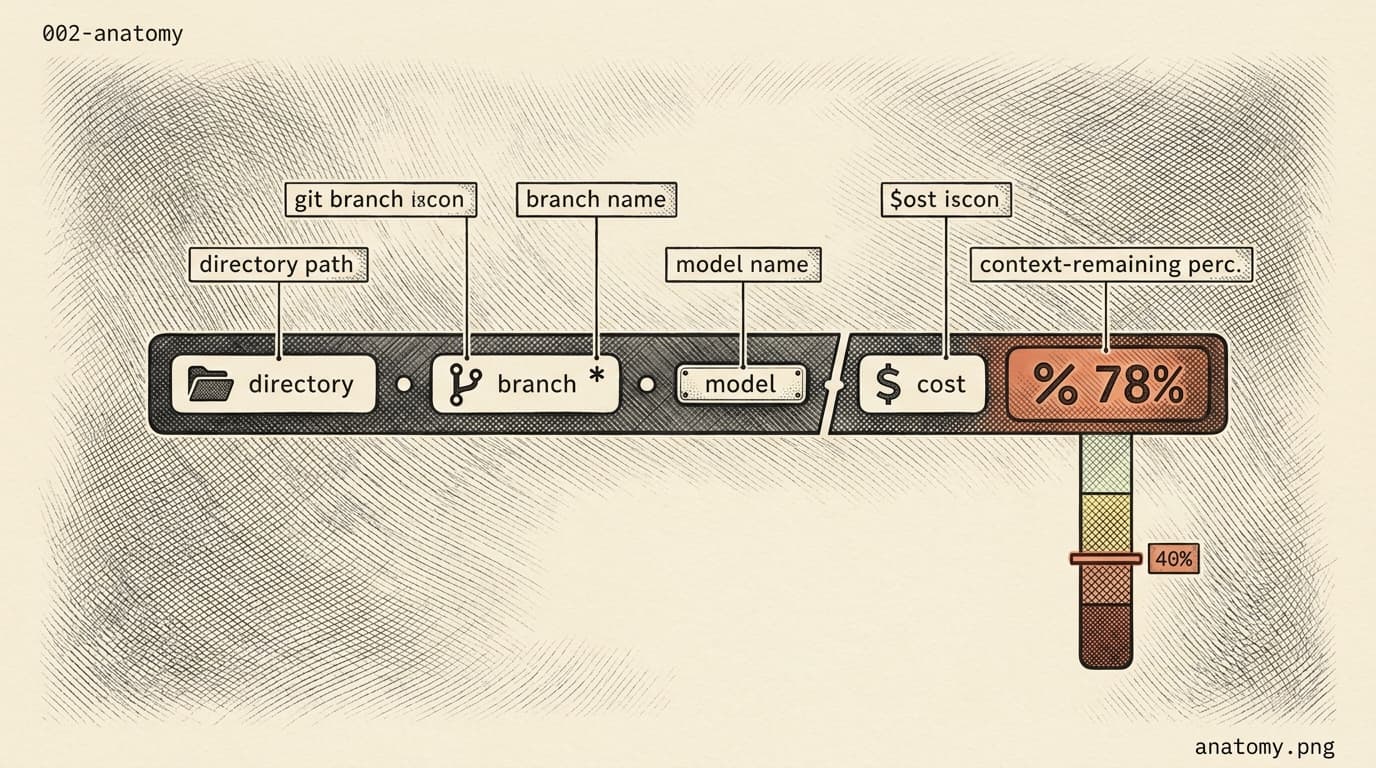
Restart Claude Code. You should now see two lines under the prompt showing: directory, branch, model on line 1; cost and context-remaining percentage on line 2.
Success looks like: my-repo main claude-opus-4-7 above $0.0412 73%.
Skip cost. You'll keep staring at the prompt with no idea how much runway you have, making the same decision I made for a year: keep typing and hope /compact handles it. It won't.
Step 2. Read the status line like a gas gauge
Every field on that second line tells you something about session health. Here's how I read mine.
- Cost (
$0.0412). Cumulative dollars this session. If you don't track this, you won't believe how expensive long sessions get until you see the receipt. - Context remaining (
73%). This is the number that matters. Color-coded: green above 50%, yellow 20-50%, red under 20%. My trigger threshold is 40%. Below that, I start planning the handoff. Below 20% I'm already too late. - Model. Opus 4.7 chews context faster than Sonnet because it's doing more. The same 40% threshold fires sooner on Opus-heavy sessions.
The full version of my status line (linked at the bottom) also shows 5-hour and 7-day rate-limit usage, and an Auckland 2x "NERFED/NORMAL" badge. Those are local preferences. The context percentage is the universal one. If your status line shows nothing else, show that.
Success looks like: the moment you see yellow, you know to start wrapping up what you're mid-stream on. The moment you see red, you know you're running on fumes and anything that isn't already written should be captured in the handoff.
Skip cost. Without color thresholds you'll learn the hard way. The first time I noticed I was at 8% remaining, it was because Claude was editing files without reading them.
Step 3. Install the session-handoff skill
The status line tells you when to act. The handoff skill is what you do. Create a folder and a SKILL.md file.
mkdir -p ~/.claude/skills/session-handoff/scriptsWrite ~/.claude/skills/session-handoff/SKILL.md:
---
name: session-handoff
description: Generate a dense handoff summary of the current session so the user can /clear and paste it into a fresh session. Use when the user says "hand off," "wrap the session," or "prep for /clear."
allowed-tools: Bash Read Write
---

# Session Handoff

Write a self-contained briefing a cold Claude session could pick up from.
Use exactly these sections, in this order. Omit a section only if it is genuinely empty.

## Where we started
<1-3 sentences on the original ask.>

## Decisions locked
- <Decision, with the reasoning in one line.>

## What shipped
- `path/to/file.ext` - <one-line description>

## Running state
- <Processes, PRs, branch names, mission IDs, anything live.>

## Key files to re-open
- `path/to/file.ext` - <why this file matters next>

## Verification deferred
- <Tests not run, checks skipped.>

## Open questions
- <Unresolved decisions the user needs to weigh in on.>

## Pick up from here
<2-4 sentences. Be directive. Reference files by path.>
And the save-and-copy script at ~/.claude/skills/session-handoff/scripts/copy-handoff.sh:
#!/usr/bin/env bash
set -euo pipefail

out_dir="${HOME}/.claude/session-handoffs"
mkdir -p "$out_dir"
ts="$(date +%Y%m%d-%H%M%S)"
dest="${out_dir}/handoff-${ts}.md"

src="${1:-}"
if [ -z "$src" ]; then
  echo "usage: copy-handoff.sh <file|->" >&2
  exit 2
fi

if [ "$src" = "-" ]; then
  cat > "$dest"
else
  cp "$src" "$dest"
fi

pbcopy < "$dest"
echo "saved: $dest ($(wc -c < "$dest" | tr -d ' ') bytes)"
echo "copied to clipboard. Next: /clear, then Cmd+V."
Then chmod +x the script. Test it:
echo "# test handoff" | ~/.claude/skills/session-handoff/scripts/copy-handoff.sh -Success looks like: saved: ~/.claude/session-handoffs/handoff-20260425-093412.md (15 bytes) and your clipboard contains # test handoff.
Skip cost. You'll keep writing ad-hoc "what I did today" notes that don't match the schema. Future-you, on the other side of /clear, won't know which file was actually shipped versus which was discussed. The rigid schema is the whole point.
Step 4. Run the handoff when the status line turns yellow
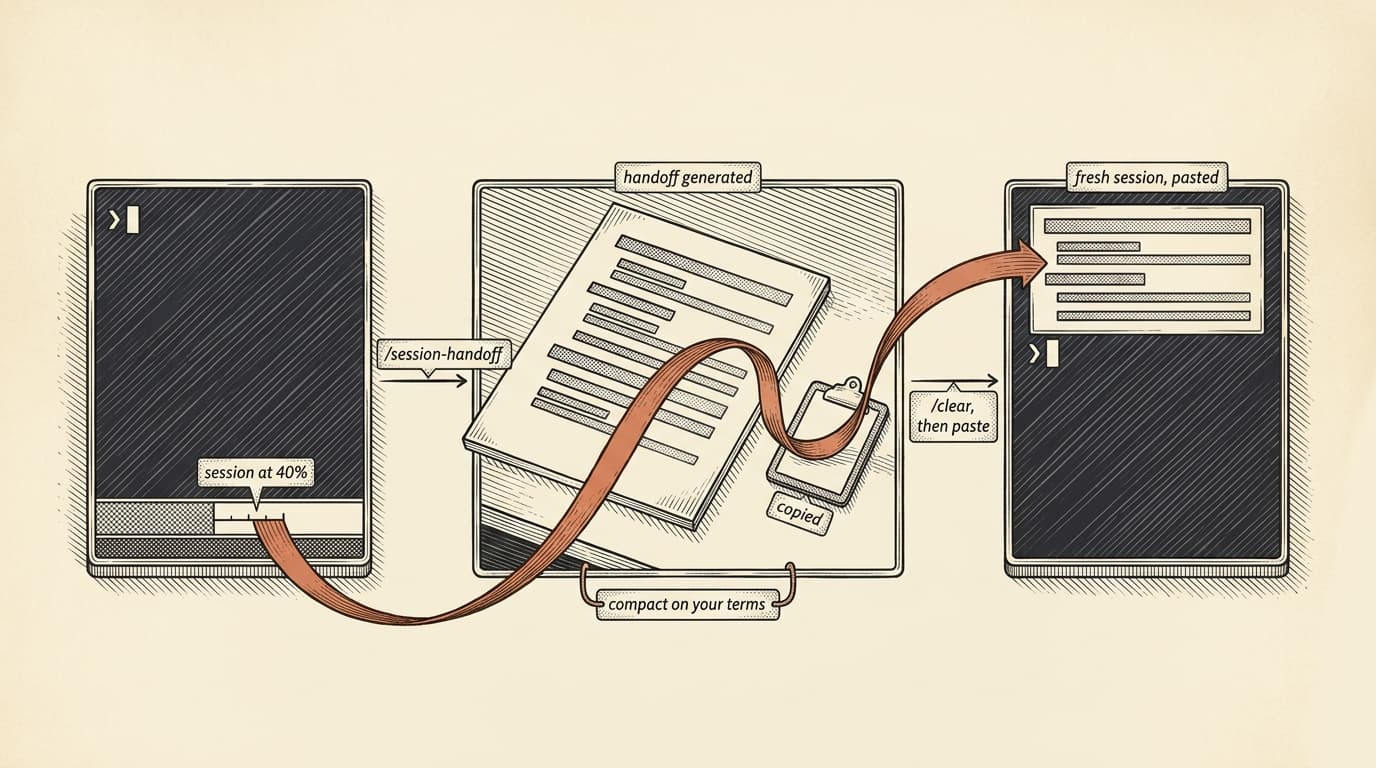
In an active session, when the status line hits your trigger threshold, type:
/session-handoffClaude reads the SKILL.md, drafts the summary in memory following the schema, pipes it through copy-handoff.sh -. The file lands in ~/.claude/session-handoffs/ with a timestamp. The clipboard has a copy ready to paste.
Then:
/clearThen paste. First line of the fresh session is the handoff. Second line is your instruction: "Read the files listed above and resume from 'Pick up from here.'"
The fresh session reads a dense map of what was decided, what was shipped, what's still running, and what it should do next. It doesn't re-read the 40,000 tokens of old conversation. It reads the 1,500-word summary and the files you pointed at. The cold session starts up faster than the tired one was running.
Success looks like: the fresh session, with no prior context, resumes the work correctly on the first turn. Mine usually does. When it doesn't, the handoff was missing something, and I add it to the schema.
Skip cost. You'll fall back to /compact or, worse, keep working in the tired session. Both cost money. Both produce worse code. The handoff-then-clear cycle is strictly better if you can stomach the 90 seconds it takes.
Step 5. Tune the threshold
My trigger is 40% remaining. Yours depends on what you do.
- Pure coding, small edits, tight loops. You can run down to 20% and the model stays sharp. 30% threshold is fine.
- Multi-file refactors, agent work, long reasoning. The model degrades earlier. 50% threshold. The context rot is real above 200K tokens on any model.
- Research or mixed sessions where you're asking questions and then acting on the answers. 40%. The degradation is somewhere in the middle.
If you're wrong, the feedback is cheap. A bad handoff costs 90 seconds. A bad session costs the rest of your afternoon. Tune by noticing: did the fresh session pick up cleanly? If yes, you can run the next one closer to the red. If not, back off to a higher threshold.
Success looks like: you find a threshold where the handoff feels slightly early rather than slightly late. Slightly early is the right error direction.
Skip cost. You'll keep running the same threshold regardless of workload and wonder why some sessions handoff cleanly and others don't. The answer is that the 40% mark on Opus doing agent work is not the same session health as 40% on Sonnet doing formatting.
The trap I see people fall into
The failure mode isn't building this wrong. It's building it and not using it. You'll install the status line, read the percentage once or twice, and then stop looking. You'll skip the handoff because the session feels fine. Two hours later you're fighting a Claude that's been editing files without reading them for the last six turns.
The status line only works if you treat it like a gas gauge, not a decoration. Glance at it every time you're about to start a new sub-task. When it's yellow, ask whether the next sub-task is big enough to justify a handoff first. When it's red, the answer is yes regardless.
An open question
What I don't have a clean answer for: the handoff schema assumes a single thread of work. If you're working on three things in one session, which is common in an agent-heavy workflow, the schema compresses all three into one summary and loses the separation. The fresh session sees a flat list of "what shipped" with no scoping. I've started experimenting with a multi-track handoff format, but I'm not sure whether I'm fixing a real problem or just adding structure for its own sake. If you've solved this, I'd like to see your schema.
For now: the two files above are enough to replace /compact in my workflow entirely. The status line tells me when. The handoff skill lets me reset on my own terms. /compact never fires automatically because I never let the session get that close to the ceiling. The model stays sharp and the work stays coherent, and I stop losing sessions to auto-summaries that drop the things I actually needed.